Turn any article into
a podcast
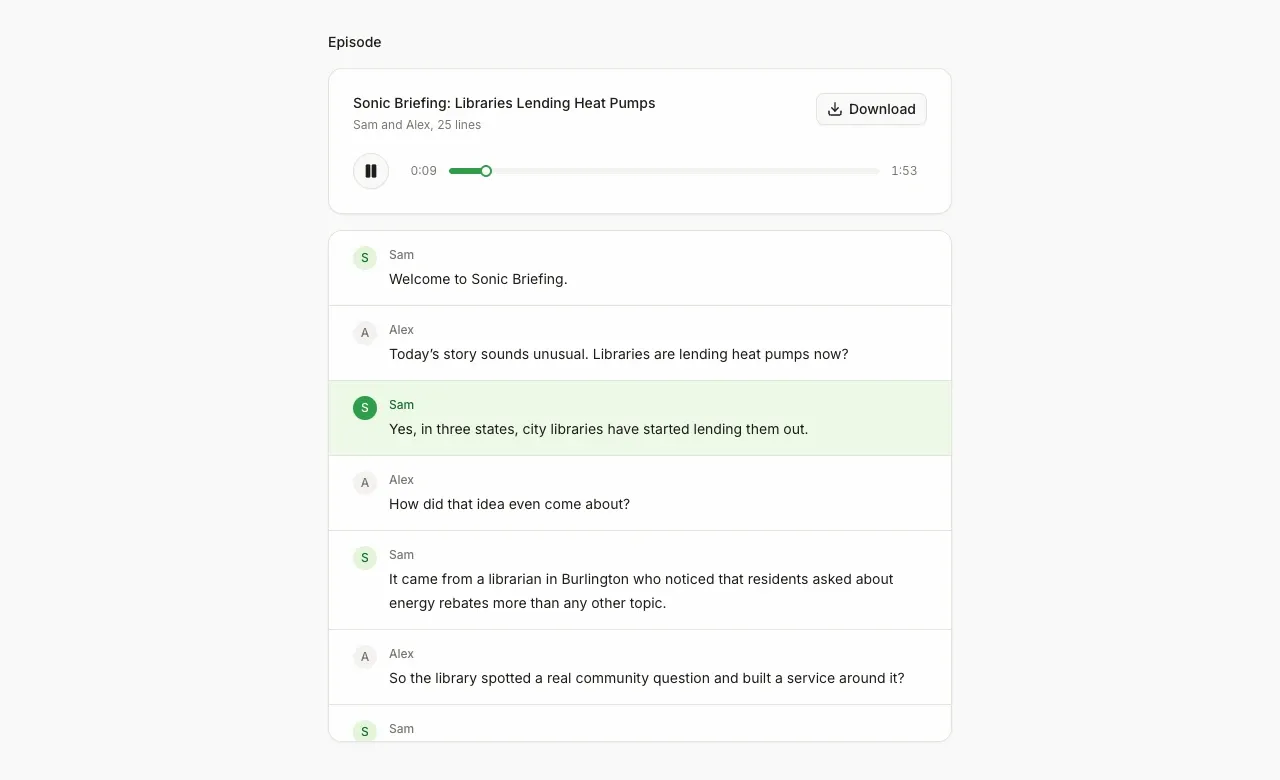
Screenshot. The template running locally.
- Models
- sonic-3.6
- Languages
- English, Spanish, French, German and 4 more
- License
- Apache-2.0
- Stack
- Next.js 16React 19AI SDKMozilla Readabilityshadcn/ui
- Cartesia products
- Sonic 3.6
What it does
Before you start, choose a short, medium or long episode and one of eight languages: English, Spanish, French, German, Portuguese, Japanese, Hindi or Korean. The LLM writes the script in that language, and Sonic reads it in the same language. The hosts are called Sam and Alex until you rename them. The finished episode downloads from the player as a WAV file.
Run it yourself
Install
Run the commands below with Node 22.22 or newer. pnpm works too. Fill
.env.localfrom the table below. Without keys the page still loads and names the variable to set.Environment variables - CARTESIA_API_KEY
play.cartesia.ai/keys- LLM_MODEL
provider/model, for exampleopenai/gpt-5.4-mini- OPENAI_API_KEY
- If
LLM_MODELstarts with openai/ - ANTHROPIC_API_KEY
- If
LLM_MODELstarts with anthropic/ - AI_GATEWAY_API_KEY
- For any other provider. Not needed on Vercel
- CARTESIA_VOICE_HOST_A
- Optional. Voice id for the first host, and
CARTESIA_VOICE_HOST_Bfor the second - APP_PASSWORD
- Optional locally. Required on Vercel, or none to make the app public
- TRUST_PROXY
- Optional. 1 behind your own reverse proxy
Make an episode
Open the local URL the dev server prints and paste a link to an article. For pages that load their text with JavaScript, switch to Paste text instead. Pick the short length for a quick first episode. Then press Make podcast.
Build it with your coding agent
One prompt that tells your coding agent where to start and what to read first.
Prompt
Build an article to podcast generator with Cartesia. Start from https:/ and follow its AGENTS.md for the commands, files and rules. The AI SDK writes the two-host script with generateText and Output.object. Speech goes through @cartesia/cartesia-js: one client.tts.generate call per line with model_id sonic-3.6 and raw pcm_s16le at 24 kHz, then the server joins the lines into one WAV. Do not use the AI SDK speech API for Sonic. If I don't have a Cartesia API key yet, follow https:/ to get one.
How it works
Why it works this way
One Sonic call per line
Each host needs a different voice, so every line is its own request. Raw audio also gives each line an exact length, which keeps the highlighted transcript in sync. The app adds 350 ms of silence when the speaker changes and 180 ms otherwise. The cost is that tone does not carry from one line to the next.
Any LLM writes the script
The script comes from the AI SDK, so any LLM provider works. Speech goes through Cartesia's JavaScript SDK, @cartesia/cartesia-js, which pins the API version on every request.
Fetched pages are untrusted
The fetcher in lib/safe-fetch.ts refuses private and internal addresses and allows only ports 80 and 443. It also caps redirects, page size at 2 MB, and time. The prompt marks the article as material to discuss and tells the LLM never to follow instructions found inside it.
Make it yours
Use other voices
Pick two voices at play.cartesia.ai/voices. Put the first host's voice id in CARTESIA_VOICE_HOST_A. The second host's goes in CARTESIA_VOICE_HOST_B. The defaults are English voices, so pick voices that match your language.
Change the show
The show name, tagline, host roles and episode outline are defaults in lib/config.ts. The instructions the LLM gets are in lib/prompt.ts.
Use another LLM provider
Set LLM_MODEL to the provider's AI Gateway id, such as google/gemini-2.5-flash. Add AI_GATEWAY_API_KEY next to it. To call the provider directly, install its AI SDK package. Then add a branch for its prefix in lib/llm.ts.
Join the teams making the switch to Cartesia
Questions
Is my Cartesia API key exposed to the browser?
No. The browser sends the script to the app's own server, which calls Sonic. The key never leaves the server.
How long does an episode take?
It depends on your LLM and the length you pick. A short episode needs one LLM call. Medium, the default, and long make several LLM calls in a row, and Sonic voices four lines at a time.
What does an episode cost?
Sonic costs about 1 credit per character of script. The app rejects scripts over 30,000 characters, so one episode costs at most about 30,000 credits, plus your LLM tokens.
Can I put it on the public internet?
Set a password with APP_PASSWORD first, because every episode spends your LLM tokens and Cartesia credits. Only convert articles you own or have permission to adapt, and label published audio as AI-generated.
Can I do this in Python?
Yes. The Sonic call works the same way in Cartesia's Python package. Start from the generate speech to a file recipe and loop over your script lines.
Is there a step-by-step guide to this template?
Yes. The recipe walks through the code, the README covers setup, environment variables and deployment, and the TTS bytes API reference explains the Cartesia side.
More from the cookbook
Get started today
Talk to an expert.
Connect with a member of our team and learn how Cartesia can help you build world-class voice experiences.
Start building.
Access our models via API and bring a voice agent into production in minutes.