Talk to
your docs
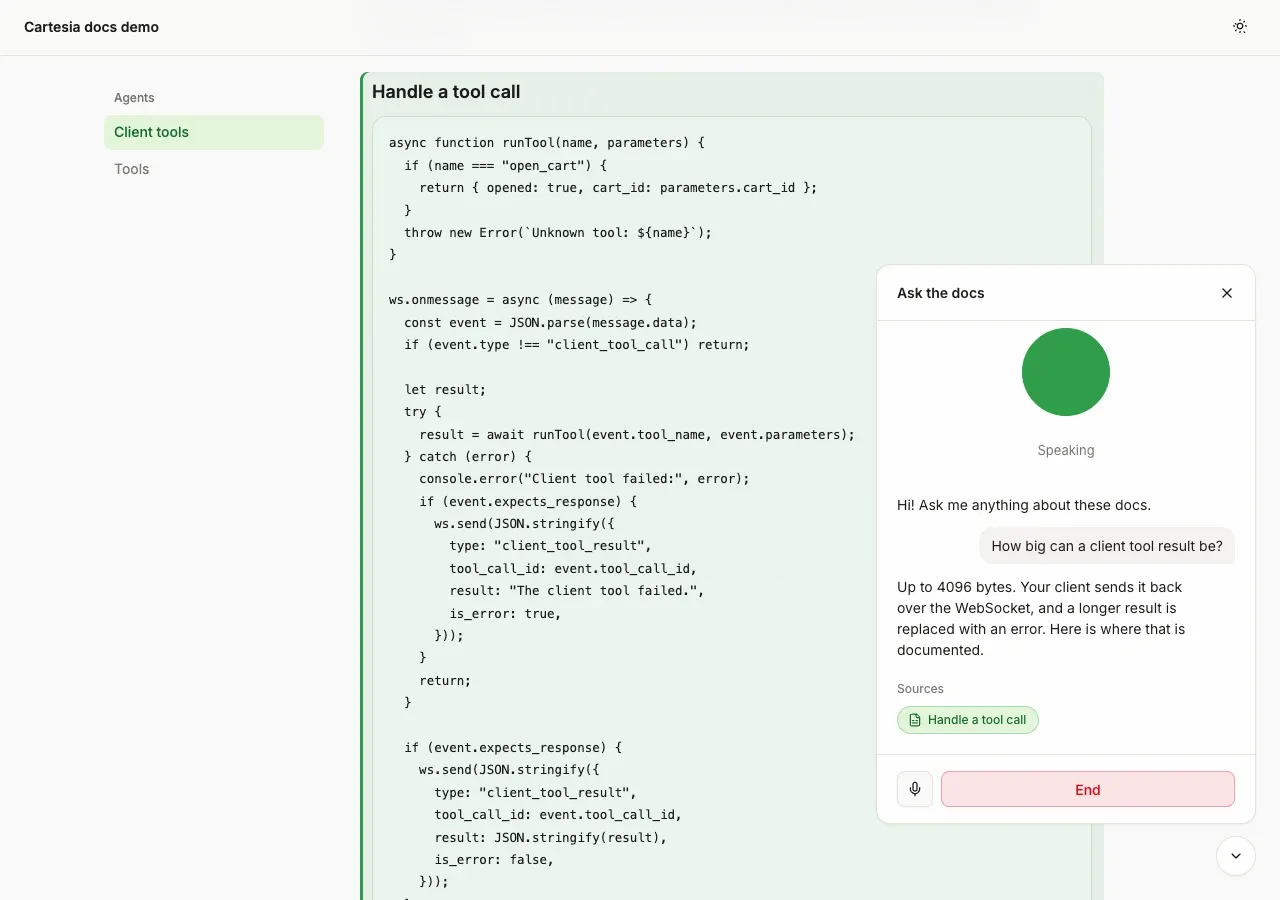
Screenshot. The template running locally.
- Models
- ink-2, sonic-3.6
- Languages
- English, Spanish, French, Hindi, Japanese
- License
- Apache-2.0
- Stack
- HonoNode.jsWeb ComponentsesbuildBM25 or OpenAI embeddings
- Cartesia products
- Managed AgentsInk 2Sonic 3.6
What it does
The widget works on any site and needs no other libraries. The server is a small Node app that keeps the search index in a local file. By default, search matches keywords. With an OpenAI key it matches by meaning, which handles questions worded differently from your docs. Re-indexing only processes the pages that changed.
Run it yourself
Run the demo
Run the commands below with Node 22.22 or newer, open
http://localhost:4512, press Ask the docs, then Start talking. The demo site is a copy of two pages fromdocs.cartesia.ai.Environment variables - CARTESIA_API_KEY
play.cartesia.ai/keys- OPENAI_API_KEY
- Optional. Switches search to
text-embedding-3-small embeddings - CARTESIA_AGENT_ID
- Written by
npm run setup:agent - CARTESIA_TOOL_IDS
- Optional. Written by
npm run setup:agentso you know which tools to delete. Nothing reads it - ALLOWED_ORIGINS
- Your docs origins, comma-separated
- PUBLIC_URL, TRUST_PROXY
- Behind a proxy.
TRUST_PROXY=1 rate limits by the address your proxy appended
Index your docs
Run
npm run ingest--./my-docs--base-url/docs/ for a folder of .md or .mdx files, ornpm run ingest -- --sitemapwith your sitemap URL for a live site.Add the script tag
Deploy the server to any host that runs Node 22.22 or newer, add one script tag pointing at its
widget.js, and setALLOWED_ORIGINSto your docs origin.
Build it with your coding agent
One prompt that tells your coding agent where to start and what to read first.
Prompt
Add a voice assistant to my documentation site with a Cartesia Managed Agent. Start from https:/ and follow its AGENTS.md for the commands, files and rules. npm run setup:agent creates the agent and two client tools, search_docs and show_source. The widget gets a 60 second access token with only the agent grant from the Hono server and opens the Managed Agents WebSocket. search_docs results come from POST /api/search and must stay under 4,096 bytes. Index my docs with npm run ingest, either from a folder or with --sitemap. If I don't have a Cartesia API key yet, follow https:/ to get one.
How it works
Why it works this way
Search runs in the visitor's browser
Cartesia only calls tools that live at a public HTTPS address. A client tool runs in the visitor's browser instead, and the browser passes the question to your server, so the demo works on localhost with no tunnel.
Results fit under 4,096 bytes
Cartesia rejects client tool results over 4,096 bytes. server/search.ts ranks the sections, gives the current page a small boost and packs the top four into a result under 3,800 bytes.
The rate limit is the real guard
The server turns away other websites by checking the Origin header, but a script can send any header it likes. What protects your account is the limit of 4 tokens a minute and 30 an hour per IP address.
Make it yours
Prompt and tools
Edit scripts/agent-config.ts, then run npm run setup:agent -- --force. It creates a new agent and two new tools and overwrites CARTESIA_TOOL_IDS, so copy the old ids first and delete the old agent and tools at play.cartesia.ai. Tool names also live in widget/src/tools.ts, so change both.
Language
Set AGENT_LANGUAGE to es, fr, hi or ja before setup. The prompt already replies in the visitor's language.
Vector store
server/store.ts is the only file that reads or writes the index. Replace it with pgvector or SQLite when a few thousand sections is not enough.
Join the teams making the switch to Cartesia
Questions
Can other websites use my widget and my API key?
No. Only the sites you list in ALLOWED_ORIGINS, plus the server's own address, can start a call. Your API keys stay on the server, and the browser gets a token that lasts 60 seconds and only works for agent calls.
Can't Cartesia's built-in knowledge base do this?
It can answer from your docs too. This template searches on your own server instead, so each result carries the page link and section the widget needs to scroll there.
Does it work on Docusaurus, Mintlify or Nextra?
Yes, anywhere you can add a script tag. Index the site from its sitemap so the section links match its headings. The widget follows the site's dark mode, or the visitor's system setting.
Why does the call end when I click a link to another page?
The call lives in the page, and a multi-page site reloads on navigation. During a call, sources on other pages open in a new tab instead.
Are visitors' calls recorded?
Yes. Cartesia records the audio and transcript of every agent call. Tell your visitors, and delete the calls you don't need through the Cartesia API.
Is there a step-by-step guide to this template?
Yes. The recipe walks through the code, the README covers setup, environment variables and deployment, and the client tools docs explain the Cartesia side.
More from the cookbook
Get started today
Talk to an expert.
Connect with a member of our team and learn how Cartesia can help you build world-class voice experiences.
Start building.
Access our models via API and bring a voice agent into production in minutes.