Turn an EPUB into
an audiobook
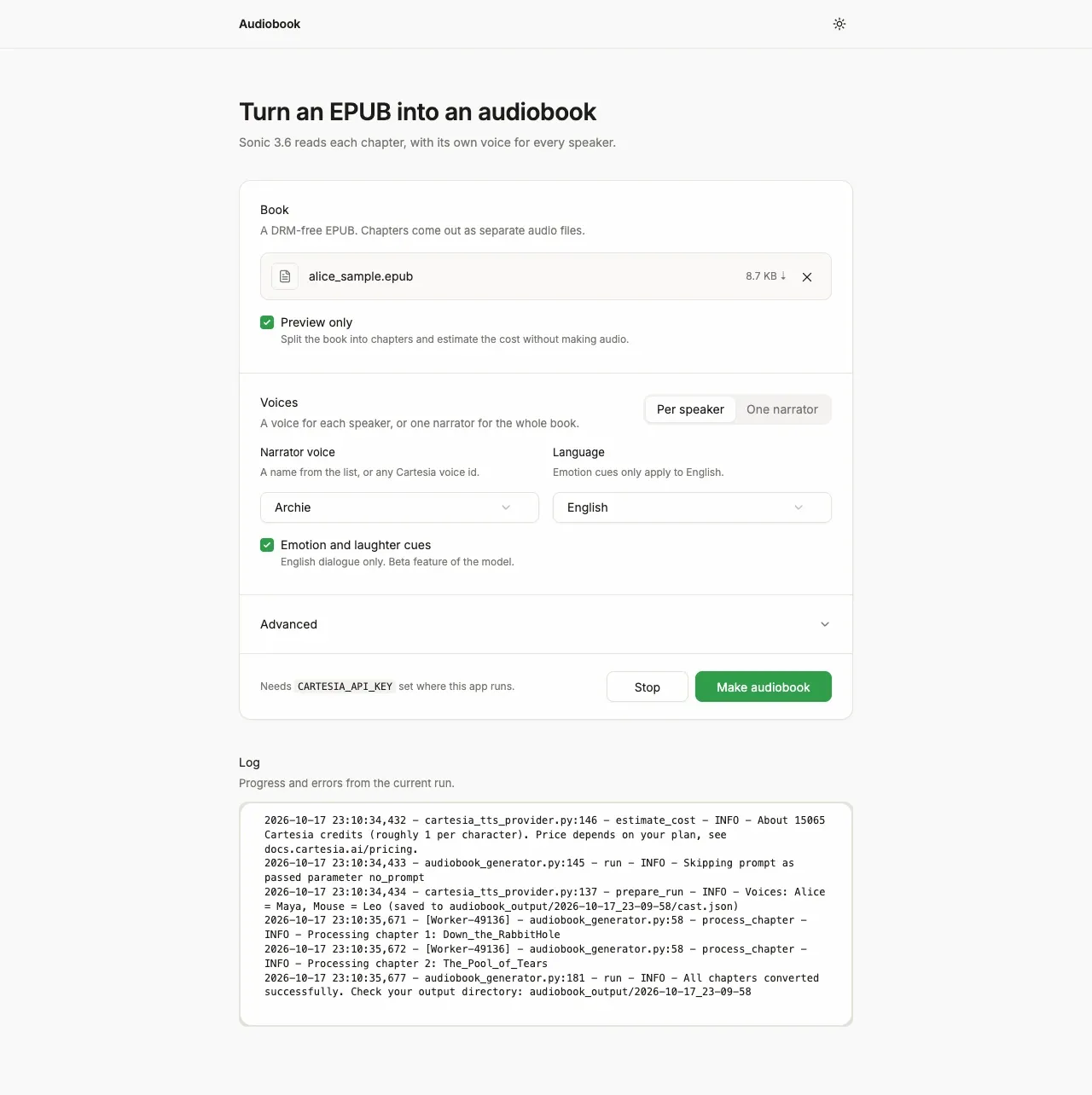
Screenshot. The template running locally.
- Models
- sonic-3.6
- Languages
- English by default, others with --language
- License
- MIT
- Stack
- PythonGradioEbookLibffmpeguv
- Cartesia products
- Sonic 3.6
What it does
The command line tool and the web app run the same conversion. The project is a fork of the open-source epub_to_audiobook by p0n1.
A bundled read-along page highlights each word as it plays, and clicking a word jumps to it. The subtitle files work in most players.
Run it yourself
Preview without a key
Run the commands below. You need Python 3.10 to 3.12, with uv and ffmpeg installed. The
--previewrun makes no audio and needs no key. It splits the sample book into chapters, counts 15,065 characters (about 15,000 credits) and writesout/cast.json, which lists the voice picked for each speaker.Environment variables - CARTESIA_API_KEY
play.cartesia.ai/keys. Not needed for--preview
Make the audio
Copy
.env.exampleto a new.envfile. Add yourCARTESIA_API_KEYto it. Load it into your shell with set -a; ../.env; set +a. Then run the same command without--preview. In scripts, add -y to skip the cost prompt.Use the web app
Run
uv run python main_ui.py.Then openhttp://127.0.0.1:7860. TheCARTESIA_API_KEYmust be set in that shell. Keep the default local host, because the app has no login and spends your credits for anyone who can reach it.Read along
Open
readalong.htmlfrom the project in a browser. Pick a chapter's MP3, then the .timings.jsonfile next to it. The current word lights up as it plays.
Build it with your coding agent
One prompt that tells your coding agent where to start and what to read first.
Prompt
Convert an EPUB into an audiobook with Cartesia. Start from https:/ and follow its AGENTS.md for the commands, files and rules. It uses the cartesia Python SDK to stream sonic-3.6 from /tts/sse with add_timestamps and use_normalized_timestamps=False, joins the raw PCM with ffmpeg into one MP3 per chapter, and writes .timings.json and .vtt files for read-along. Run a --preview first, which needs no key, to check the character count and out/cast.json. If I don't have a Cartesia API key yet, follow https:/ to get one.
How it works
/tts/sse with word timestamps, up to 1,500 characters a requesttimings.json and a .vtt file per chapterWhy it works this way
Streaming gives word timings
Cartesia's plain speech endpoint returns audio only. The read-along files need the time of each word, and only the streaming endpoints return that. The app also sets use_normalized_timestamps=False, which keeps words as written, such as $5, so the highlight matches the book.
Voices are fixed before any chapter
The cast is decided once, before conversion starts, so parallel workers and reruns agree on who reads which speaker. A quote with no speaker tag, such as said Alice, goes to the last speaker, or to the other person when two characters trade lines in back-to-back paragraphs.
Dialogue cues set the emotion
In English dialogue, a word such as whispered, shouted or sobbed next to a quote tells Sonic to read that quote calm, angry or sad. Laughed adds a laugh before the line.
Make it yours
Pick the voices
Edit out/cast.json and run again. To reuse a cast, pass your own file with --cast_file. Each value is a built-in voice name, such as Archie. It can also be any voice id from play.cartesia.ai/voices.
Use one voice
Run with --cast_mode narrator to read the whole book, dialogue included, in one voice. Choose that voice with --voice_name.
Convert another language
Pass --language fr or any other Sonic language code. Each speaker still gets a voice. Emotion and laughter cues work only in English.
Join the teams making the switch to Cartesia
Questions
How much does it cost to convert a book?
Sonic bills about one credit per character, and the pauses between paragraphs are added locally for free. Run with --preview first to get the character count. What a credit costs depends on your plan, so the tool prints no dollar amount.
Does it get the right voice for each character?
Mostly, in books that tag dialogue with said Alice and the like. It misses speakers who are only implied, and untagged back-and-forth between two people can swap. Check the cast file after a preview and fix it, or read the whole book in one voice.
Can I play it in an audiobook app like Audiobookshelf?
Yes. Each MP3 carries title, author, album and track tags, so Audiobookshelf and similar servers group the chapters into one book.
Can I convert any book?
Only convert books you own or have the rights to, and label published output as AI-generated audio. The template ships two public-domain chapters of Alice's Adventures in Wonderland for testing.
Is there a step-by-step guide to this template?
Yes. The recipe walks through the code, the README covers setup, environment variables and deployment, and the TTS over server-sent events reference explains the Cartesia side.
More from the cookbook
Get started today
Talk to an expert.
Connect with a member of our team and learn how Cartesia can help you build world-class voice experiences.
Start building.
Access our models via API and bring a voice agent into production in minutes.