Interactive stories
with a voice for every character
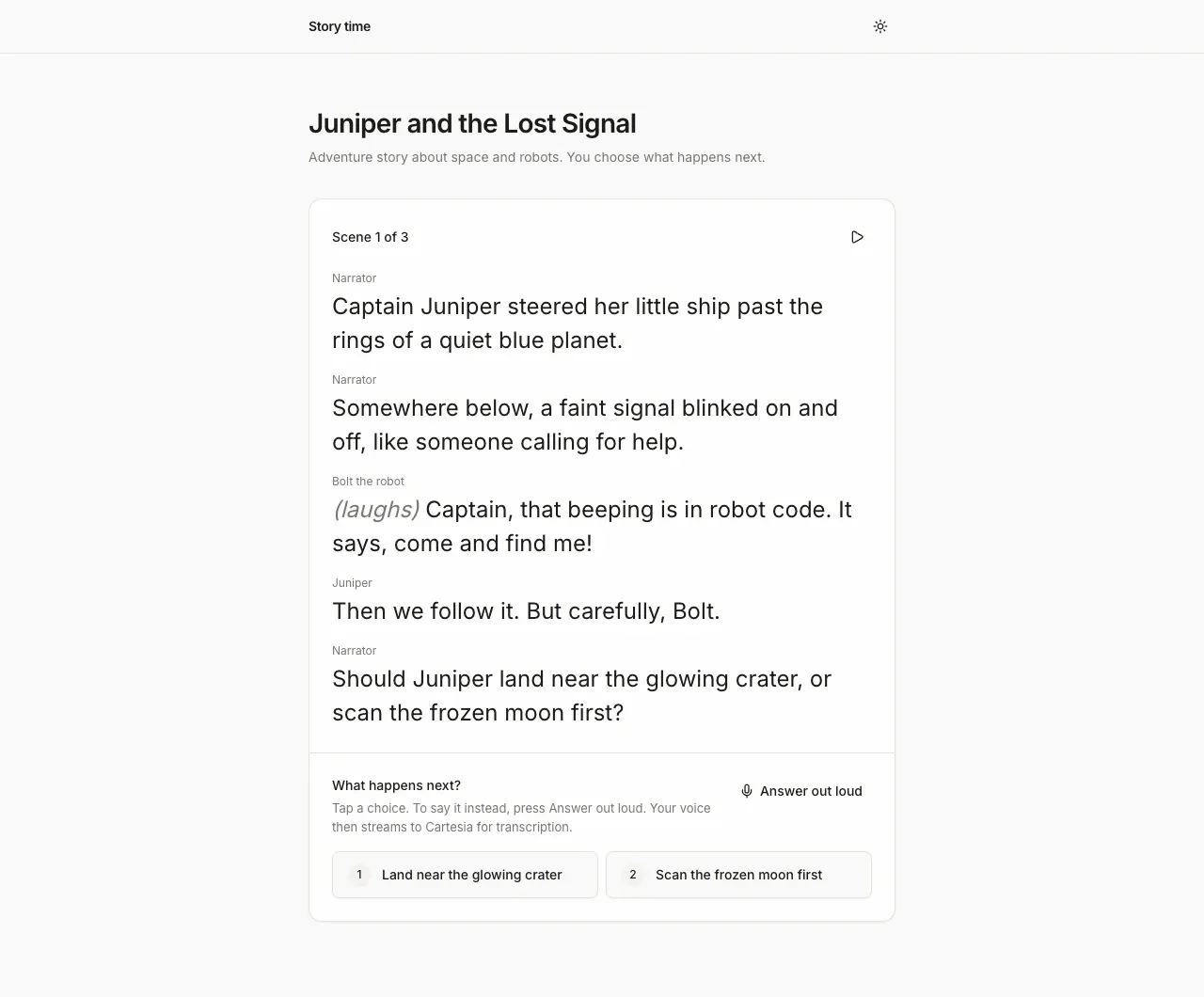
Screenshot. The template running locally.
- Models
- sonic-3.6, ink-2
- Languages
- English
- License
- Apache-2.0
- Stack
- Next.js 16React 19AI SDKIndexedDBshadcn/ui
- Cartesia products
- Sonic 3.6Ink 2
What it does
Each story has three short scenes. An LLM writes them from the theme and tone you pick, and Sonic 3.6 reads them aloud. The narrator and every character speak in their own voice, and each word lights up as it is read.
At the end of a scene, you choose what happens next from two options. Tap one, or say it out loud. Content safety is on by default, and every scene is checked before it plays.
Run it yourself
Install
Run the commands below with Node 22.22 or newer. pnpm works too. Fill
.env.localfrom the table below. If a key is missing, the page says which.Environment variables - CARTESIA_API_KEY
play.cartesia.ai/keys- LLM_MODEL
provider/model, for exampleopenai/gpt-5.4-mini- OPENAI_API_KEY
- If
LLM_MODELstarts with openai/. Recommended with any model, because it turns on scene moderation - ANTHROPIC_API_KEY
- If
LLM_MODELstarts with anthropic/ - AI_GATEWAY_API_KEY
- For any other provider
- APP_PASSWORD
- Optional locally. Required on Vercel, or none to make the app public
- TRUST_PROXY
- Optional. 1 behind your own reverse proxy
Start a story
Open the URL that
npm run devprints. Pick a theme and a tone, name the hero if you like, and press Start the story. When a scene ends, tap one of the two choices, or press Answer out loud and say it.
Build it with your coding agent
One prompt that tells your coding agent where to start and what to read first.
Prompt
Build an interactive story app with Cartesia. Start from https:/ and follow its AGENTS.md for the commands, files and rules. The AI SDK writes each scene. The browser gets a 60 second access token with the tts and stt grants, reads the scene with sonic-3.6 over the TTS WebSocket using one context per line (each with its own voice, emotion and add_timestamps), and hears the listener's choice with ink-2 on /stt/turns/websocket, opening the mic only when they press Answer out loud. Keep the content-safety rules in AGENTS.md. If I don't have a Cartesia API key yet, follow https:/ to get one.
How it works
Why it works this way
A new voice for each speaker
Sonic can run several streams on one connection, each with its own voice and emotion. So the narrator, the hero and a talking dragon take turns without reconnecting. Each new character gets the next voice from a pool.
Your words stay in the browser
Ink 2 turns your answer into text, and the page matches it to a choice right in the browser. Only the chosen option goes back to the LLM, never what you said. The mic opens only when you press Answer out loud.
Replays make no API calls
Each scene is saved in the browser's IndexedDB with its audio and word timings. Replaying a story from the library plays it back with the highlight and calls nothing.
Make it yours
Use different voices
The voice ids are in lib/story.ts. Swap them for voices from play.cartesia.ai/voices.
Make longer stories
Raise TOTAL_SCENES in lib/story.ts from its default of 3. Each extra scene costs one LLM call and its narration.
Tell stories in another language
Ink 2 and Sonic both speak Spanish, French, Hindi and Japanese. Set the narration language in lib/narrate.ts and add it to the story prompt. Translate the word lists the app uses to match spoken choices and to check safety. Turn off the emotion settings, which work only in English.
Join the teams making the switch to Cartesia
Questions
How does it keep stories safe?
Themes and tones are presets, and the prompt bans graphic violence, sexual content and hate. Every scene is also checked against a word list, plus OpenAI's moderation service if you add an OpenAI key. No filter is perfect, so read a few stories before you share it.
Where do my choices and my voice go?
The story settings, the hero's name and your choices go to the LLM provider you pick. If you add an OpenAI key, the settings and each scene also go to OpenAI for moderation. Spoken answers stream to Cartesia, and the app's own server stores no audio and no stories.
Is my Cartesia API key exposed in the browser?
No. The key stays on the server. The browser gets a token that lasts 60 seconds and works only for speech.
How does the word highlighting work?
Sonic sends the start time of each word along with the audio. The page checks the playback clock on every frame and lights up the word being spoken.
Why does the first scene take a few seconds?
The LLM writes the whole scene before the narration starts, so a smaller model makes the wait shorter. After that, later lines are voiced while earlier ones play.
Is there a step-by-step guide to this template?
Yes. The recipe walks through the code, the README covers setup, environment variables and deployment, and the TTS WebSocket contexts docs explain the Cartesia side.
More from the cookbook
Get started today
Talk to an expert.
Connect with a member of our team and learn how Cartesia can help you build world-class voice experiences.
Start building.
Access our models via API and bring a voice agent into production in minutes.