A receptionist that answers
every call
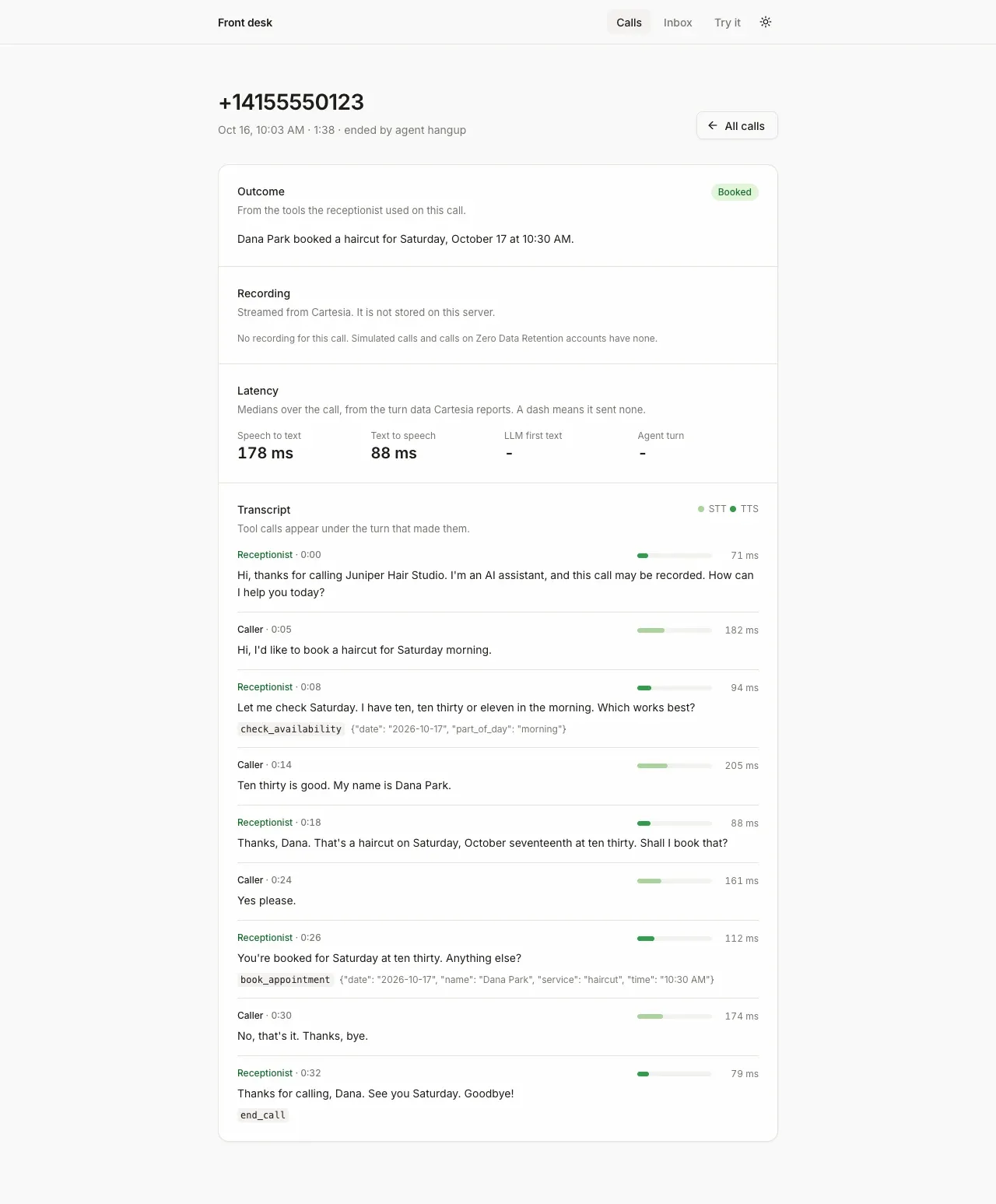
Screenshot. The template running locally.
- Models
- ink-2, sonic-3.6
- Languages
- English
- License
- Apache-2.0
- Stack
- PythonFastAPIhtmxSQLiteuv
- Cartesia products
- Managed AgentsInk 2Sonic 3.6Phone numbers
What it does
Every call shows up in a dashboard with its transcript, its recording and how fast the agent answered each turn. You can try the whole thing in the browser with only a Cartesia API key. Once it is deployed, you can give it a phone number.
Run it yourself
Install and create the agent
Run the commands below with Python 3.12 or newer and uv.
setup_agent.pycreates the agent and its four tools.Environment variables - CARTESIA_API_KEY
play.cartesia.ai/keys- CARTESIA_AGENT_ID
- Written by
scripts/setup_agent.py - BUSINESS_NAME
- Optional, with the other BUSINESS_ settings. Defaults to a hair salon in Los Angeles
- PUBLIC_BASE_URL
- For phone calls. The server's public HTTPS address
- DASHBOARD_PASSWORD
- Required once deployed. HTTP Basic password for the dashboard and call routes
- UVICORN_HOST
- Optional. The address uvicorn binds without
--host - TRUST_PROXY
- Optional. 1 behind a proxy such as Render, Fly or Railway
- CALCOM_API_KEY
- Optional, with
CALCOM_EVENT_TYPE_ID. Books into Cal.com
Call it from the browser
Open
http://localhost:8000/try, press Start call and ask for an appointment. Use headphones, or the agent hears itself.Put it on a phone number
Deploy to a host with HTTPS, set
PUBLIC_BASE_URLandDASHBOARD_PASSWORD, and run setup again. Then attach a Cartesia number, a Twilio number or a SIP trunk to the agent.
Build it with your coding agent
One prompt that tells your coding agent where to start and what to read first.
Prompt
Build an AI phone receptionist on a Cartesia Managed Agent. Start from https:/ and follow its AGENTS.md for the commands, files and rules. scripts/setup_agent.py creates the agent with POST /v1/agents and its tools with POST /v1/agents/tools. Without PUBLIC_BASE_URL the tools are client tools for browser calls; with it they become webhook tools and a call webhook is registered. The browser gets a 60 second access token with only the agent grant. Check x-webhook-secret in constant time, as front_desk/webhooks.py does. If I don't have a Cartesia API key yet, follow https:/ to get one.
How it works
/try, or a phone numbercheck_availability, book_appointment, take_message and transfer_callWhy it works this way
One tool list for browser and phone calls
The four tools are defined once, in front_desk/tools.py. On your laptop, the browser call passes each tool request to your server. Once you deploy with a public address, Cartesia calls your server directly, for phone and browser calls alike.
Cartesia's requests carry a shared secret
Cartesia sends the secret you registered back with every request, in the x-webhook-secret header. The server compares it in constant time, ignores events meant for another agent and skips retries it has already handled.
Latency comes from the call data
Cartesia records per-turn timings for speech to text, the LLM and text to speech with each call. The dashboard reads them from there instead of timing anything itself.
Make it yours
Your business
Set BUSINESS_NAME, BUSINESS_SERVICES, BUSINESS_TIMEZONE, BUSINESS_HOURS and APPOINTMENT_MINUTES, then run setup again.
What the receptionist says
Edit front_desk/prompt.py, then run setup again. Keep the AI and recording disclosure in the greeting.
Another tool
Add a spec and a method to front_desk/tools.py. Setup creates the Cartesia tool, and both tool routes pick it up.
Join the teams making the switch to Cartesia
Questions
Can I use my own phone number?
Yes. Import a Twilio number you already have, connect your own carrier over SIP, or take a free US number from Cartesia. Transfers to a person only work on Twilio or SIP calls.
Is my Cartesia API key safe when people call from the browser?
Yes. The key stays on your server. The browser gets a token that lasts 60 seconds and only works for calls to agents.
Can strangers see my calls once it's online?
Not if you set DASHBOARD_PASSWORD. Then every dashboard page and recording asks for that password, and the app refuses to start on a public address without one.
Does it tell callers they are talking to an AI?
Yes. The default greeting says the caller is talking to an AI assistant and that the call may be recorded.
Are calls recorded?
Yes. Cartesia records the audio and transcript of every agent call by default, and the dashboard plays recordings from there. Your server keeps call details and transcripts but not the audio, and nothing is deleted until you delete it.
Is there a step-by-step guide to this template?
Yes. The recipe walks through the code, the README covers setup, environment variables and deployment, and the Managed Agents tools docs explain the Cartesia side.
More from the cookbook
Get started today
Talk to an expert.
Connect with a member of our team and learn how Cartesia can help you build world-class voice experiences.
Start building.
Access our models via API and bring a voice agent into production in minutes.