Meeting notes
from a recording
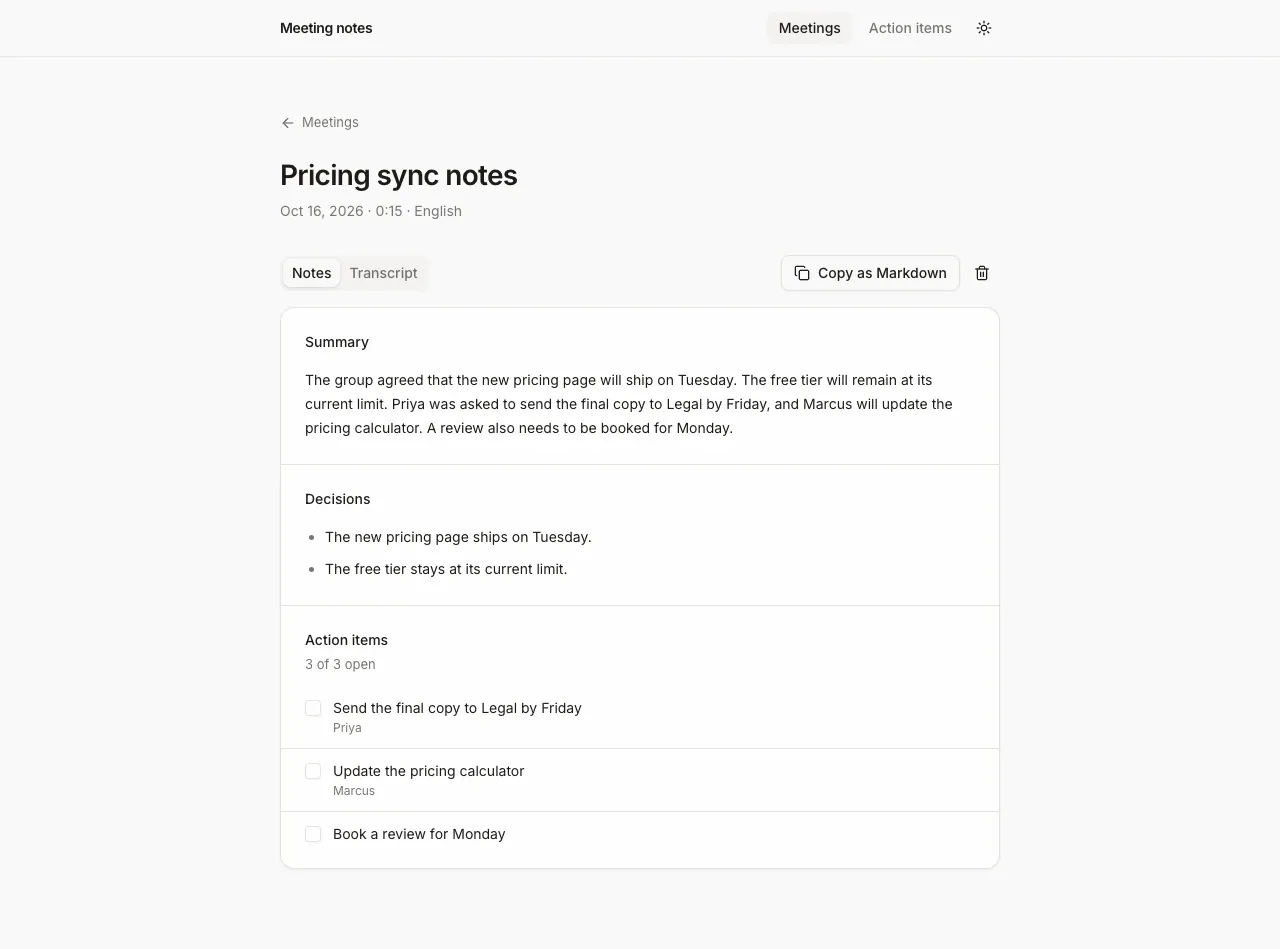
Screenshot. The template running locally.
- Models
- ink-whisper
- Languages
- 17 in the menu
- License
- Apache-2.0
- Stack
- Next.js 16React 19AI SDKIndexedDBshadcn/ui
- Cartesia products
- Ink
What it does
Meetings are saved in your browser, so there is no database and no login. Each meeting can be copied as Markdown. A separate page collects the open action items from every meeting.
Run it yourself
Install
Run the commands below with Node 22.22 or newer. pnpm works too. Fill
.env.localfrom the table below. If a key is missing, the page says which.Environment variables - CARTESIA_API_KEY
play.cartesia.ai/keys- LLM_MODEL
provider/model, for exampleopenai/gpt-5.4-mini- OPENAI_API_KEY
- If
LLM_MODELstarts with openai/ - ANTHROPIC_API_KEY
- If
LLM_MODELstarts with anthropic/ - AI_GATEWAY_API_KEY
- For any other provider. Not needed on Vercel
- APP_PASSWORD
- Optional locally. Required on Vercel, or none to make the app public
- TRUST_PROXY
- Optional. 1 behind your own reverse proxy
Record a meeting
Open the local URL the dev server prints and press Start recording. Talk for a few seconds. Then press Stop and write notes. To use an audio file instead, switch to the upload tab above the recorder.
Build it with your coding agent
One prompt that tells your coding agent where to start and what to read first.
Prompt
Build a meeting notes app with Cartesia speech to text. Start from https:/ and follow its AGENTS.md for the commands, files and rules. The server route transcribes the recording with client.stt.transcribe from @cartesia/cartesia-js and model ink-whisper (ink-2 is streaming only and does not work on the batch endpoint). The AI SDK writes the summary, decisions and action items with generateText and a zod schema. The browser posts audio to the route and never sees CARTESIA_API_KEY. If I don't have a Cartesia API key yet, follow https:/ to get one.
How it works
Why it works this way
The transcript is saved first
The page saves the transcript as soon as ink-whisper returns it, then asks for the notes. If the summary fails, the meeting keeps its transcript and shows a Retry button that asks the LLM again.
A finished recording uses the file model
Cartesia has two speech to text models. Ink 2 transcribes live audio as it streams and does not accept a finished file. ink-whisper takes the whole recording in one request, which is what this app sends.
Uploads stop at 4 MB
Vercel rejects request bodies over 4.5 MB. So the app caps uploads at 4 MB, and the recorder stops at 3.6 MB or 20 minutes. On another host you can raise the limit in lib/limits.ts.
Make it yours
Transcribe another language
Pick the language in the Spoken language menu before you record. To add one to the menu, extend the list in lib/limits.ts. The model accepts many more ISO 639-1 codes.
Change what the notes contain
Edit the schema in lib/schema.ts to add or remove fields. Edit lib/prompt.ts to change the instructions the LLM gets.
Store notes on a server
Replace the five async functions in lib/store.ts with calls to your database and keep the hooks.
Join the teams making the switch to Cartesia
Questions
Where does the meeting audio go?
The browser sends it to the app's own server, which passes it to Cartesia for transcription and then drops it. The transcript goes to your LLM provider for the notes, and your Cartesia key never leaves the server. Get everyone's consent before you record.
Can I get a live transcript while the meeting is happening?
Not with this app. It sends the whole recording when you stop. For live captions, stream the microphone to Cartesia Ink 2 instead.
Which languages work?
The menu lists 17, from English and Spanish to Japanese and Ukrainian. The LLM writes the notes in the language of the meeting.
What does a meeting cost?
Transcription costs 1 Cartesia credit per 2 seconds of audio, silence included, so a 30 minute meeting is 900 credits. The notes add one LLM call on your own provider key.
Does it know who said what?
No. The transcript has no speaker labels, so an action item gets an owner only when someone says that person's name. The LLM is told not to guess.
Is there a step-by-step guide to this template?
Yes. The recipe walks through the code, the README covers setup, environment variables and deployment, and the batch transcription API reference explains the Cartesia side.
More from the cookbook
Get started today
Talk to an expert.
Connect with a member of our team and learn how Cartesia can help you build world-class voice experiences.
Start building.
Access our models via API and bring a voice agent into production in minutes.