An interpreter
in your pocket
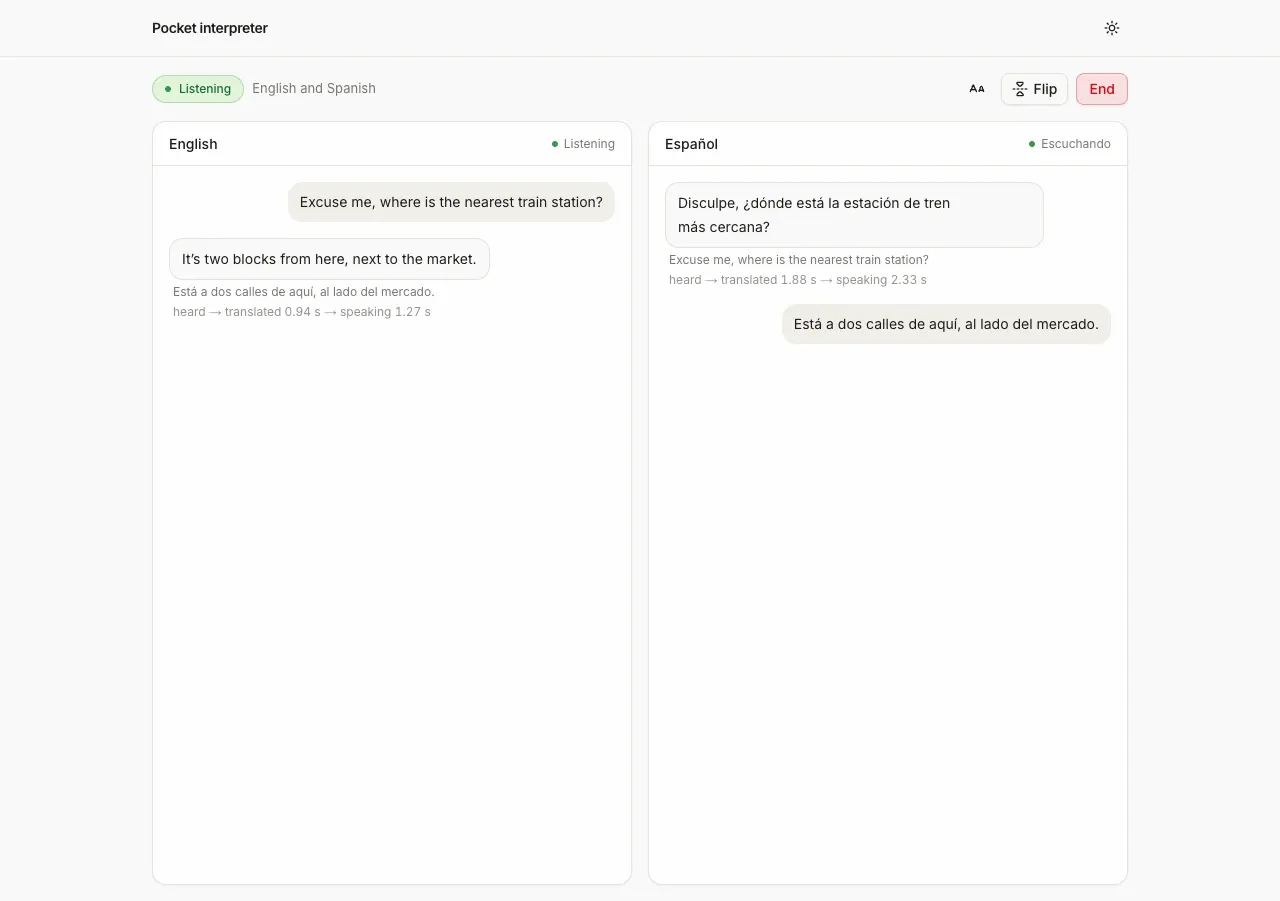
Screenshot. The template running locally.
- Models
- ink-2, sonic-3.6
- Languages
- Any two of English, Spanish, French, Hindi, Japanese
- License
- Apache-2.0
- Stack
- Next.js 16React 19AI SDKWeb Audioshadcn/ui
- Cartesia products
- Ink 2Sonic 3.6
What it does
The screen splits so each person reads the conversation in their own language, and one half can turn upside down for a phone lying flat between you. Under each translated turn, a small line shows the time to the first translated word and to the first audio.
Run it yourself
Install
Run the commands below with Node 22.22 or newer. pnpm works too. Fill
.env.localfrom the table below. If a key is missing, the page says which.Environment variables - CARTESIA_API_KEY
play.cartesia.ai/keys- LLM_MODEL
provider/model, for exampleopenai/gpt-5.4-mini- OPENAI_API_KEY
- If
LLM_MODELstarts with openai/ - ANTHROPIC_API_KEY
- If
LLM_MODELstarts with anthropic/ - AI_GATEWAY_API_KEY
- For any other provider
- APP_PASSWORD
- Optional locally. Required on Vercel, or none to make the app public
- TRUST_PROXY
- Optional. 1 behind your own reverse proxy
Start talking
Open the URL that
npm run devprints. Pick the two languages and press Start talking. Then take turns speaking, with nothing to press in between. A phone needs HTTPS for the microphone, so deploy it or use a tunnel such as cloudflared to try it on one.
Build it with your coding agent
One prompt that tells your coding agent where to start and what to read first.
Prompt
Build a two-person voice translation app with Cartesia. Start from https:/ and follow its AGENTS.md for the commands, files and rules. The server mints a 60 second access token with only the stt and tts grants. The browser streams the microphone to ink-2 on /stt/turns/websocket with @cartesia/cartesia-js, sends each turn to an AI SDK route that replies with the language code and the translation, and speaks it with sonic-3.6 over the TTS WebSocket. Keep the mute gate that sends silence to Ink 2 while Sonic plays. If I don't have a Cartesia API key yet, follow https:/ to get one.
How it works
Why it works this way
Translation starts before the turn ends
When you pause, Ink 2 sends an early guess that you may be done, and the page starts translating right away. If you were done, it uses that translation. If you keep talking, it cancels it and waits for the full sentence.
The LLM says who spoke
Ink 2 doesn't report which language it heard. So the translation reply starts with a language code on its own line. The page uses that code to pick the voice and the side of the screen.
The app mutes itself while it speaks
While a translation plays, the microphone sends silence to Ink 2. Otherwise the app would hear its own voice and translate it back, forever.
Make it yours
Use a different voice
The voice for each language is set in lib/languages.ts. Pick replacements from the Cartesia voice library, or use your own clone, made only with the speaker's permission.
Change how it translates
Edit lib/prompt.ts to make translations formal or casual. Keep the language code on the first line of the reply, because the app reads it to pick the voice.
Tune turn detection
Ink 2 decides when a turn ends. To make it wait longer or end sooner, set turn_end_timeout_ms when the app opens the speech connection. That call is in lib/audio/listener.ts.
Join the teams making the switch to Cartesia
Questions
Is my Cartesia API key safe?
Yes. The key stays on the server. The browser gets a token that lasts 60 seconds and can only turn speech into text and text into speech.
Where does the conversation go?
Both people's speech goes to Cartesia, and the text of each turn goes to your LLM provider for translation. Tell the other person before you start.
Can both people talk at the same time?
No. There is one microphone and one turn at a time, so wait for a translation to finish playing. You don't press anything between turns, because Ink 2 can tell a pause from the end of a sentence.
Which languages does it support?
Any two of English, Spanish, French, Hindi and Japanese. Those are the languages Ink 2 can hear. Adding another language needs a different speech-to-text model.
Does it work on a phone?
The layout is built for a phone first. It was tested in desktop Chrome with a recorded voice as the microphone, not on a real phone.
Does it need headphones?
No. The app mutes its own microphone while it speaks and for a third of a second after. In a loud room, background voices can still start a stray turn.
Is there a step-by-step guide to this template?
Yes. The recipe walks through the code, the README covers setup, environment variables and deployment, and the Ink 2 turn events docs explain the Cartesia side.
More from the cookbook
Get started today
Talk to an expert.
Connect with a member of our team and learn how Cartesia can help you build world-class voice experiences.
Start building.
Access our models via API and bring a voice agent into production in minutes.