A voice journal
that reads your week back
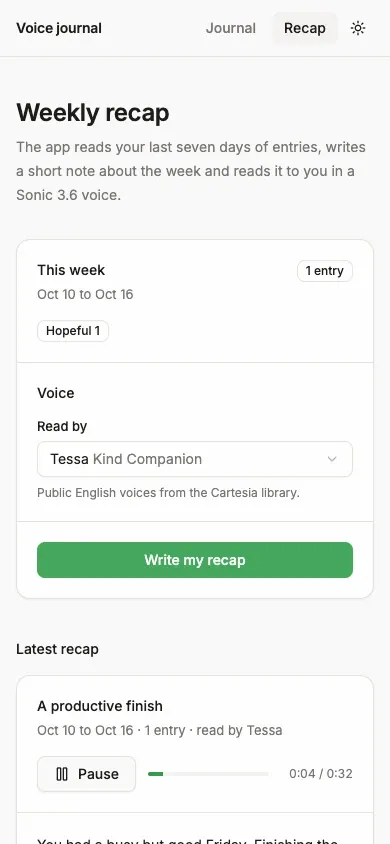
Screenshot. The template running locally.
- Models
- ink-whisper, sonic-3.6
- Languages
- English
- License
- Apache-2.0
- Stack
- ExpoReact NativeExpo Router API routesAI SDKAsyncStorage
- Cartesia products
- InkSonic 3.6
What it does
One app runs on iOS, Android and the web. Entries stay on your device, so there is no database and no login. Recordings go to Cartesia for transcription, and transcripts go to your LLM provider. The app says so under the record button, and its server stores no audio.
Run it yourself
Install
Run the commands below with Node 22.22 or newer. pnpm works too. Fill
.env.localfrom the table below.Environment variables - CARTESIA_API_KEY
play.cartesia.ai/keys- LLM_MODEL
provider/model, for exampleopenai/gpt-5.4-mini- OPENAI_API_KEY
- If
LLM_MODELstarts with openai/ - ANTHROPIC_API_KEY
- If
LLM_MODELstarts with anthropic/ - AI_GATEWAY_API_KEY
- For any other provider
- TRUST_PROXY
- Optional. 1 behind your own reverse proxy
Record an entry
Run
npm run dev, then press w to open the web app. To use a phone instead, scan the QR code with Expo Go, Expo's free app for trying projects. Record an entry with Start recording. Then open Recap and tap Write my recap.
Build it with your coding agent
One prompt that tells your coding agent where to start and what to read first.
Prompt
Build a voice journal app in Expo with Cartesia. Start from https:/ and follow its AGENTS.md for the commands, files and rules. Expo Router API routes hold the keys: /api/transcribe sends each recording to ink-whisper with client.stt.transcribe from @cartesia/cartesia-js, the AI SDK writes the title, mood, reflection and weekly recap, and /api/speak turns the recap into an MP3 with sonic-3.6 through client.tts.generate. Never give a key an EXPO_PUBLIC_ prefix. If I don't have a Cartesia API key yet, follow https:/ to get one.
How it works
Why it works this way
A finished recording needs no stream
A journal entry is a finished recording, so one upload to ink-whisper is simpler than a live stream. Streaming would also need raw audio while you talk, and Expo's recorder can't give you that on the web.
The recap is written to be heard
The recap reads your last seven days of entries, oldest first, and comes out at 120 to 200 words written for listening. Sonic 3.6 returns it as an MP3 that plays on every platform.
Make it yours
Change the default voice
The default voice is set in lib/limits.ts. Pick a replacement from the Cartesia voice library, then update its tagline in app/recap.tsx.
Transcribe another language
Change the transcription language in app/api/transcribe+api.ts. Then change the speech language in app/api/speak+api.ts and pick a voice that speaks it.
Change the moods
The list of moods is in lib/schema.ts. The prompts for the reflection and the recap are in lib/server/prompts.ts.
Join the teams making the switch to Cartesia
Questions
Is my API key safe in a mobile app?
Yes, as long as it stays on the server. The app's server routes read the key, and it never goes into the app that ships to phones. Don't give a key the EXPO_PUBLIC_ prefix, because Expo puts those values in the app where anyone can read them.
Does it work on a real iPhone or Android phone?
Yes, in Expo Go during development. For a store build, you deploy the server routes and point the app at them. The web build was tested in Chrome, and the phone builds compile but were not run on a device.
Can I put it online as is?
No. The server routes are open to anyone, so add sign-in and check it in each route before you deploy. The built-in rate limit only slows casual abuse.
Is this a therapy app?
No. The prompts tell the model not to diagnose or give medical advice. If an entry mentions self-harm, the model points to someone you trust or a local crisis line.
Can I use my own voice for the recap?
Not in this template. Voice cloning was left out on purpose, so the app only uses voices from the Cartesia library.
Is there a step-by-step guide to this template?
Yes. The recipe walks through the code, the README covers setup, environment variables and deployment, and the batch transcription API reference explains the Cartesia side.
More from the cookbook
Get started today
Talk to an expert.
Connect with a member of our team and learn how Cartesia can help you build world-class voice experiences.
Start building.
Access our models via API and bring a voice agent into production in minutes.